Accelerometer Axis Calibration
Calibration process to obtain precise vehicle inclination and movement measurements.
What is it for?
| Use case | Description |
|---|---|
| 🎯 Measurement precision | Correct mounting or installation errors |
| 🚗 Maneuver detection | Improve precision in braking, acceleration and turns |
| 📐 Real inclination | Obtain correct roll, pitch and yaw angles |
| 🔧 Post-installation | Calibrate after mounting equipment in vehicle |
Calibration Methods
⭐ Intelligent Calibration (Recommended)
SCALINTFully automatic calibration that combines rest detection and stable GPS.
| Feature | Description |
|---|---|
| 🤖 Automatic | Detects optimal conditions without intervention |
| 📡 GPS required | Uses GPS signal for high Yaw precision |
| 🔄 Persistent | Automatically retries until completed |
| 🔍 Intelligent | Adapts to driving conditions |
Automatic process:
- 🤖 Automatic rest detection (5+ seconds without movement)
- 📊 Automatic Roll/Pitch calibration (~15 seconds)
- 🛰️ Automatic wait for stable GPS (speed + constant heading)
- 🧭 Automatic Yaw calibration using GPS as reference
- ✅ Result saved automatically
Requirements:
- Valid and stable GPS
- Minimum speed of 5 km/h for Yaw calibration
- Constant GPS heading for at least 6 seconds
Response: RCALINT OK - Intelligent auto-calibration started
Recommendation: Use SCALINT for most installations. It’s the simplest and most accurate method, ideal for self-calibrating fleets.
Full Automatic Calibration
SCALSTART2-phase automatic calibration that includes Roll/Pitch and Yaw.
| Phase | Description | Time |
|---|---|---|
| Phase 1 | Roll/Pitch calibration at rest | ~15 seconds |
| Phase 2 | Movement detection and Yaw calibration | ~10-20 seconds |
Process:
- 🔧 Keep device completely stable for 15 seconds
- 🚗 Move the vehicle in a straight line
- 📊 System automatically detects forward orientation
- ✅ Full calibration applied automatically
Response: RCALSTART OK
This process requires user intervention for vehicle movement, unlike SCALINT which is fully automatic.
Roll/Pitch Only Calibration
SCALSTART1Calibrates only Roll and Pitch angles through rest detection.
| Feature | Description |
|---|---|
| ⏱️ Time | ~15 seconds |
| 📋 Requirements | Vehicle at rest only |
| 🎯 Precision | High for inclination |
| 🛰️ GPS | Not required |
Typical use:
- Quick device inclination correction
- Installations where Yaw doesn’t need calibration
- First phase before running
SCALSTART2
Response: RCALSTART1 OK - Roll/Pitch calibration started
Yaw Only Calibration
SCALSTART2Calibrates only the Yaw angle through forward movement detection.
| Feature | Description |
|---|---|
| ⏱️ Time | ~5-10 seconds |
| 📋 Requirements | Vehicle movement |
| 🛰️ GPS | Recommended (higher precision) |
| 🎯 Precision | High with GPS, medium without GPS |
Process:
- 🚗 Move the vehicle in a straight line
- 📊 System detects maximum change in accelerometer
- 🧭 Identifies which axis corresponds to forward movement
- ✅ Yaw calibration applied automatically
Recommendation: Run SCALSTART1 first for better Yaw calibration results.
Response: RCALSTART2 OK - Yaw calibration started
Manual Calibration
For cases where specific angles and offsets need to be set:
SCAL<enable>[,<roll>][,<pitch>][,<yaw>][,<offset_x>][,<offset_y>][,<offset_z>]| Parameter | Description | Range | Required |
|---|---|---|---|
| enable | Enable/disable calibration | 1 or 0 | Yes |
| roll | Lateral inclination (X axis) | -180° to +180° | No |
| pitch | Frontal inclination (Y axis) | -180° to +180° | No |
| yaw | Orientation (Z axis) | -180° to +180° | No |
| offset_x | X axis offset | mg | No |
| offset_y | Y axis offset | mg | No |
| offset_z | Z axis offset | mg | No |
Examples:
>SCAL1<                              // Enable only (preserves current values)
>SCAL1,10,20,30<                     // Set angles only
>SCAL1,,,,-5,10,15<                  // Offsets only (preserves angles)
>SCAL1,10,20,30,-5,10,15<            // Full configuration
>SCAL0<                              // Disable calibration
Control and Monitoring
SCALSTOP — Stop Calibration
SCALSTOPStops any automatic calibration process in progress.
Response: RCALSTOP OK
QCALSTAT — Calibration Status
QCALSTATQueries the current calibration process status.
Response:
RCALSTAT<active>,<state>,<detailed_status>detailed_status is itself a list of 6 comma-separated values: mode (MANUAL/SEQUENTIAL/FULL/ROLL_PITCH/YAW/INTELLIGENT), phase, progress %, roll/pitch calibrated (0/1), yaw calibrated (0/1) and retries. At rest it reads IDLE,0,0,0,0,0.
Possible states (state):
| State | Meaning |
|---|---|
IDLE | No active calibration |
INIT | Initializing process |
COLLECTING_STATIC | Collecting rest data (Roll/Pitch) |
POS2_UPHILL | Collecting position 2 (uphill) |
POS3_DOWNHILL | Collecting position 3 (downhill) |
POS4_LEFT_TILT | Collecting position 4 (left tilt) |
POS5_RIGHT_TILT | Collecting position 5 (right tilt) |
POS6_DYNAMIC | Collecting position 6 (dynamic) |
WAIT_MOVEMENT | Waiting for vehicle movement |
COLLECTING_MOVEMENT | Analyzing movement (Yaw) |
CALCULATING | Calculating the final result |
COMPLETED | ✅ Calibration completed |
ERROR | ❌ Process error |
INTELLIGENT_WAIT_REST | Waiting for automatic rest (SCALINT) |
INTELLIGENT_WAIT_GPS | Waiting for stable GPS (SCALINT) |
INTELLIGENT_YAW_RETRY | Retrying Yaw calibration (SCALINT) |
Monitoring example:
>QCALSTAT<
RCALSTAT1,COLLECTING_STATIC,MANUAL,ROLL_PITCH,50,0,0,0

>QCALSTAT<  // after a few seconds
RCALSTAT1,WAIT_MOVEMENT,MANUAL,YAW,0,1,0,0

>QCALSTAT<  // after movement
RCALSTAT1,COMPLETED,MANUAL,YAW,100,1,1,0
QCAL — Configuration Query
QCALQueries the current calibration configuration.
Response:
RCAL<enabled>,<roll>,<pitch>,<yaw>,<offset_x>,<offset_y>,<offset_z>Example:
RCAL1,10.50,5.20,-15.30,-2.10,1.80,9.40- Calibration enabled
- Roll: 10.5°, Pitch: 5.2°, Yaw: -15.3°
- Offsets: X=-2.1mg, Y=1.8mg, Z=9.4mg
QCALMAT — Transformation Matrix
QCALMATQueries the full calibration transformation matrix.
Response:
RCALMAT<enabled>,<offset_x>,<offset_y>,<offset_z>,<m00>,<m01>,<m02>,<m10>,<m11>,<m12>,<m20>,<m21>,<m22>| Field | Description |
|---|---|
| enabled | Matrix state (1=active, 0=inactive) |
| offset_x,y,z | Correction offsets for each axis |
| m00-m22 | 3x3 rotation matrix |
Example:
RCALMAT1,-2.10,1.80,9.40,0.985,0.174,0.000,-0.174,0.985,0.000,0.000,0.000,1.000Axis Orientation (ISO 8855)
The system follows the ISO 8855 automotive standard.
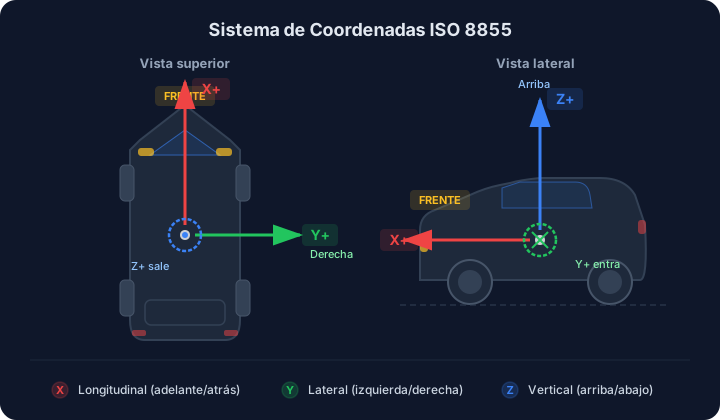
🔴 X Axis — Longitudinal (Forward/Backward)
| Direction | Value | Example |
|---|---|---|
| Accelerating (forward) | +X | X+008 |
| Braking (backward) | -X | X-015 |
🟢 Y Axis — Lateral (Left/Right)
| Direction | Value | Example |
|---|---|---|
| Toward the right (passenger side) | +Y | Y+010 |
| Toward the left (driver side) | -Y | Y-012 |
🔵 Z Axis — Vertical (Up/Down)
| Direction | Value | Example |
|---|---|---|
| Upward (opposite to gravity) | +Z | Z+105 |
| Normal on flat surface | ~100 dg | Z+090 to Z+120 |
Rotation Angles
| Angle | Positive (+) | Negative (-) |
|---|---|---|
| Roll (X axis) | Tilt toward the right (passenger side down) | Tilt toward the left (driver side down) |
| Pitch (Y axis) | Nose up (rear down) | Nose down (front down) |
| Yaw (Z axis) | Clockwise rotation seen from above (toward right) | Counter-clockwise rotation seen from above (toward left) |
Reference Values
| Condition | X Axis | Y Axis | Z Axis |
|---|---|---|---|
| 🅿️ Rest | ≈ 0 | ≈ 0 | ≈ 100 dg |
| 🚗 Normal driving | ± 20 dg | ± 20 dg | ≈ 100 dg |
| ⚠️ Sudden maneuver | > ± 50 dg | > ± 50 dg | Variable |
Unit: 100 dg = 1G (gravitational force). Valid gravity range: 90-110 units (~0.9G - 1.1G)
Recommended Workflows
Intelligent Calibration (Recommended)
>SCALINT<                 // Start intelligent mode
>QCALSTAT<               // Monitor progress
// (System automatically detects rest and GPS)
>QCAL<                   // Verify final result
Quick Inclination Calibration
>SCALSTART1<             // Calibrate Roll/Pitch only
>QCALSTAT<              // Check progress
// (Wait 15 seconds at rest)
>QCAL<                  // Verify result
Full Phased Calibration
>SCALSTART1<             // Phase 1: Roll/Pitch
>QCALSTAT<              // Monitor
// (Wait for rest)
>SCALSTART2<             // Phase 2: Yaw
>QCALSTAT<              // Monitor
// (Move vehicle in straight line)
>QCAL<                  // Verify full result
Specific Manual Calibration
>QCAL<                              // View current state
>SCAL1,15.5,-2.3,45.0<              // Set specific angles
>QCAL<                              // Verify application
// (Field test)
>SCAL1,15.5,-2.3,45.0,-1,2,5<      // Adjust offsets if needed
Decision Matrix
| What do you need? | Command | Time | GPS |
|---|---|---|---|
| Inclination only (Roll/Pitch) | SCALSTART1 | ~15s | No |
| Orientation only (Yaw) | SCALSTART2 | ~5-10s | Recommended |
| Full controlled calibration | SCALSTART | ~25-35s | Recommended |
| Full automatic calibration | SCALINT | Variable | Yes |
| Specific manual values | SCAL1,... | Immediate | No |
When to Calibrate
| Situation | Action |
|---|---|
| 🆕 First installation | Always calibrate after mounting |
| 🔄 Orientation change | Recalibrate if position is modified |
| ❓ Erroneous readings | Verify and recalibrate |
| 🔧 Maintenance | Periodic calibration recommended |
Optimal Conditions
- ✅ Level surface
- ✅ Stable vehicle (no vibrations)
- ✅ GPS available (for SCALINT and Yaw)
- ✅ Sufficient battery (process may take several minutes)
Data Persistence
- Configuration is automatically saved to non-volatile memory (EEPROM/NVS)
- Values persist between device restarts
SCAL0disables but does not erase calibrated values- Calibration is automatically applied at system initialization
Troubleshooting
| Problem | Solution |
|---|---|
| Calibration won’t start | Verify with >SCALSTOP< that no other is in progress |
QCALSTAT shows ERROR | Stop with >SCALSTOP<, verify conditions and retry |
| Yaw won’t complete | Verify valid GPS, speed > 5 km/h, straight line movement |
| Incorrect results | Disable with >SCAL0< and recalibrate with >SCALINT< |
| Rest not detected (SCALINT) | Ensure vehicle is completely still, no engine vibration |
See Also
- AC Command — Accelerometer reading
- CXAC Command — Accelerometer configuration
- HM Command — Sudden maneuver detection
- MVT Command — Movement detection