Accessories and Connections
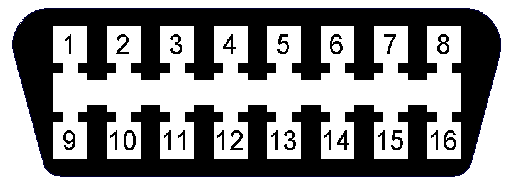
Reference: Check the Connector Pinout to locate the pins.
🚗 Ignition Detection
| Pin | Color | Connection |
|---|---|---|
| 6 | Pink | +12V with key in contact |
Verify that it is not an ACC cable (accessories) - it turns off when starting the engine.
📥 Digital Inputs and Outputs
Pins 3, 4 and 5 are multifunction and can be configured as input or output:
| Pin | Color | Input | Output | Additional functions |
|---|---|---|---|---|
| 5 | Brown/Black | IN00 | XP02 | Analog (AD) |
| 4 | Purple | IN01 | XP01 | Analog · Counter · 1-Wire |
| 3 | Brown | IN02 | XP00 | Analog (AD) |
| 1 | Blue/Black | IN03 | - | CAN-L (shared) |
Configuration: The mode of each pin is defined by command. The same pin cannot be input and output simultaneously.
As Digital Input
Detect connection to GND (negative active). Typical uses: door sensors, panic button, hood sensor.
As Digital Output
Type open collector (close to GND when activated). Typical uses: cutoff relay, indicator LED, siren.
Relay connection: +12V → Relay Coil → XPx → GND (internal)
As Analog Input
Any input can measure voltage (0-30V). Useful for fuel level, analog sensors.
Pin 4 - Special functions
- Pulse counter: For odometer, flow sensor
- 1-Wire: DS18B20 temperature sensor, iButton keys
🌡️ 1-Wire (iButton / Temperature)
| Signal | Pin | Color |
|---|---|---|
| DATA (OW) | 4 | Purple |
| GND | 7 | Black |
1-Wire Bus: Multiple devices can be connected in parallel (sensors + iButtons).
🚌 CAN BUS
CAN Bus interface for reading vehicle data (ECU, OBD-II).
Pinout
| Signal | Pin | Color | OBD-II |
|---|---|---|---|
| CAN-H | 2 | Blue | Pin 6 |
| CAN-L | 1 | Blue/Black | Pin 14 |
Connections
🔌 Direct ECU
Direct connection to vehicle ECU:
| Vehicle ECU | Spider IoT | Color | |
|---|---|---|---|
| CAN-H | → | CANH (Pin 2) | Blue |
| CAN-L | → | CANL (Pin 1) | Blue/Black |
Verify the CAN connector location in the vehicle manual.
💡 LED Indicators
| LED | Status | Meaning |
|---|---|---|
| GPS | Blinking | Searching for signal |
| GPS | Off | Valid position ✅ |
| GSM | Red | Initialized, waiting to connect |
| GSM | Green | Connected ✅ |
📍 Recommended Location
| ✅ Recommended | ❌ Avoid |
|---|---|
| Under dashboard | Metallic surfaces |
| Sky view (GPS) | Near engine |
| Protected from moisture | Areas with water |