Rinho on Wialon
This note gathers everything needed to add a Rinho device to Wialon and make the most of it: which device type to choose, how to point the device, under which name each value shows up in Wialon, and how to add custom data without asking for changes on the platform.
The parameter names, the CAN mapping and the behavior of the AP field in this note were
measured on Wialon Hosting on 10/11/2026 with a Spider IoT and a Zero IoT running firmware
1.09.28.T63, sending frames with known values and reading what Wialon published.
1. Two ways to connect
| Rinho TAIP protocol | Wialon IPS | |
|---|---|---|
| Device type in Wialon | One per model (Rinho Zero IoT, Rinho SPIDER IoT, …) | Rinho IPS, the same for every model |
| Transport | UDP | TCP |
| What it decodes | Rinho frames (CQ, ER, EQ, …), CAN included, plus the AP field | Position, altitude, HDOP, inputs, outputs, voltages and the parameters of the device template |
| Device configuration | The usual one: the same device can report to Wialon and to another platform with the same frame | Protocol W, password and report template |
| WLP template | The model’s | The same as in TAIP |
| Recommended for | Fleets already working with TAIP, CAN, every model | Integrators who already run everything on Wialon IPS |
In most cases TAIP is the better choice: it is the device’s native protocol, Wialon decodes it completely, and with the AP field any additional value can be published without switching protocols. With the templates in this note, both protocols publish the data under the same names: you can move from one to the other without touching Wialon.
2. Device types and ports
Rinho types available on Wialon Hosting:
| Model | Device type in Wialon | Port |
|---|---|---|
| Rinho Zero IoT | Rinho Zero IoT | 22912 |
| Rinho Spider IoT | Rinho SPIDER IoT | 22496 |
| Rinho Smart IoT | Rinho SMART IoT | 22499 |
| Rinho C5 Plus | Rinho C5 Plus | 21757 |
| Rinho C3 | Rinho C3 | 22497 |
| Rinho Ultralite | Rinho Ultralite | 22498 |
| Any IoT model with Wialon IPS | Rinho IPS | 22500 |
- Wialon Hosting server: the one Wialon indicates for each device type. The test devices in
this note report to
nl.gpsgsm.org. On Wialon Local or on an integrator’s server, the host and port are defined by whoever administers that server. - Unit unique ID: the one the device sends in the
ID=field of each frame. On IoT models it is the IMEI. Query it with>QID<. - Every model uses the same protocol: the device type defines the port and the model name in Wialon, but the data is decoded the same way (Spider and Zero published exactly the same in every test).
3. Recipe: adding a device to Wialon
With the Rinho TAIP protocol (recommended)
1. In Wialon, create the unit:
| Field | Value |
|---|---|
| Device type | The model’s (table in section 2) |
| Unique ID | The device IMEI (>QID<) |
| Password | Empty (TAIP does not use it) |
2. On the device, point it to the port of the device type (example for a Zero IoT):
>SIP0"nl.gpsgsm.org",22912<   // main server
>SIP1"nl.gpsgsm.org",22912<   // redundant main server
>SCXIPPP5<                    // TAIP over UDP on the main and backup channels
3. Report template: the standard user report with the AP field (included in the configurator’s Wialon configuration). On Spider IoT and Smart IoT, for engine data, the periodic rule has to generate an ER (J1939) or EQ (OBD-II) report.
4. Import the WLP template for the model (section 10).
5. Verify: new messages show up in Wialon, and on the device >QBU< answers
RBUOK00000 (nothing waiting for acknowledgement).
With Wialon IPS
1. In Wialon, create the unit with device type Rinho IPS, unique ID = IMEI. The
password can be left empty or set: the device has to send the same one (step 2).
2. On the device (example for a Zero IoT):
>SCXIPWP5<                    // Wialon IPS on the main channel, TAIP UDP on the backup one
>SIP0"nl.gpsgsm.org",22500<   // port of the "Rinho IPS" type
>SIP1"nl.gpsgsm.org",22500<
>SWLNA<                       // unit with no password in Wialon: NA. If it has one, SWL<the password>
>SUC00 QWD0| $rep_num:1:| #| $,cel_level:1:'CSQ',pwr_int:2:'V/100'<
For Spider IoT and Smart IoT, the template with engine data:
>SUC00 QWD0| $rep_num:1:| #| $,cel_level:1:'CSQ',pwr_int:2:'V/100',rpm:1:'ECU(0;0)',fuel_lvl:2:'ECU(2;0)',odometer:2:'ECU(3;0)',odoliter:2:'ECU(4;0)',refr_temp:1:'ECU(6;0)',oil_press:1:'ECU(7;0)',trip_time:2:'ECU(10;0)'<The rules already on the device are left untouched: they keep generating the GU0… user report,
which now goes out in Wialon IPS.
3. Import the same WLP template for the model (section 10):
there is no separate template for Rinho IPS. The device templates above use the same parameter
names as TAIP, so the sensors are the same.
4. Verify: >QBU< at RBUOK00000 and >QDL< with nothing pending (the second number at 00000).
Password: with an empty SWL the device sends #L#<IMEI>; and Wialon rejects the login
silently: the unit receives no messages at all. With no password in Wialon, load >SWLNA<.
Switching protocols with the device installed
The reports already queued on the device were built for the previous protocol and the new server
does not acknowledge them: they hold back every report behind them. Before switching, check
>QBU< and >QDL<. If there are pending reports and they can be discarded, after the switch:
>CBU<    // empties the send queue
>SDLC<   // empties the datalog
Notes
- Transport: TAIP uses UDP (the factory default). Wialon IPS uses TCP.
- Acknowledgement (TAIP): Wialon answers
>ACK;#<nro>;ID=<id>;*<checksum><to each frame. The device resends until it receives it and only then drains its queue: nothing is lost without coverage. Since April 2025 Wialon also acknowledges frames with date and time set to zero. - Keep-alive: if configured (
>SKA120,B<, for example), each keep-alive uses a message number. That is why in Wialonmess_num“skips” a number every now and then: it is not a lost frame.
4. What Wialon decodes from each frame
| Frame | What Wialon publishes |
|---|---|
| CQ | Position and the base fields |
| ER | Base fields + the 10 CAN J1939 values |
| EQ | Base fields + the OBD-II values (without the VIN) |
| BQ | Base fields. The internal battery is not published |
| HQ | Base fields. The internal battery and the hour meter are not published |
| HV | Base fields. Internal battery, hour meter and temperatures are not published |
| CV | Base fields. Temperatures are not published |
User reports (GU…) | The same as the frame they imitate, if they start with $RCQ, $RER, etc. |
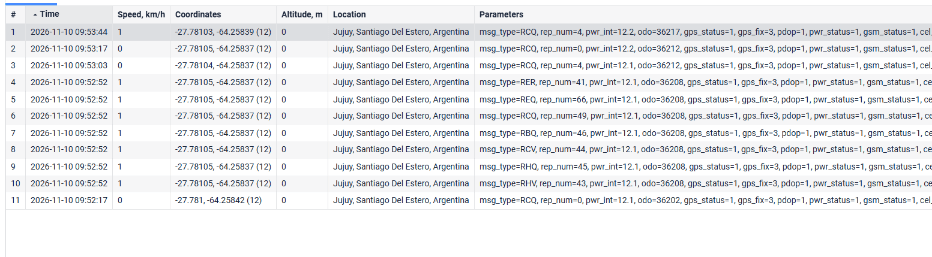
What Wialon does not publish from BQ, HQ, HV and CV can still be sent: in the AP field of any frame, under any name you like.
5. Base parameters
Every frame publishes:
| Parameter in Wialon | Rinho field | Meaning |
|---|---|---|
msg_type | Header | Frame type: RCQ, RER, REQ, RBQ, RHQ, RHV, RCV |
rep_num | AA | Event number. See event number |
pwr_int | JJJ | Main power supply voltage (V) |
odo | KKKKKKKK | Device odometer (m) |
gps_status | L | GPS on (1) or off (0) |
gps_fix | M | 2 = 2D fix, 3 = 3D fix |
pdop | NN | PDOP |
pwr_status | Q | Modem on (1) or off (0) |
gsm_status | R | Cellular network registration (0 to 5) |
cel_level | SS | CSQ cellular signal (0 to 30, 99 = no signal) |
mess_num | #nnnn | Message number (the one the ACK acknowledges) |
In addition, Wialon takes the speed, heading, number of satellites and the inputs
and outputs from the frame. TAIP frames carry no altitude: Wialon shows 0.
Inputs and outputs
The inputs byte of the frame (HH) is published as-is in the Wialon inputs, and the outputs byte
(II) in the outputs:
| Wialon | Rinho device |
|---|---|
in1 … in7 | IN0 … IN6 |
in8 | Ignition (IGN) |
out1 | XP0 |
out2 | XP1 |
Verified with a frame with inputs A5 and outputs 02: Wialon showed inputs 165 (in1,
in3, in6, in8) and outputs 2 (out2). For an ignition sensor in Wialon use in8.
6. CAN: names in Wialon
ER — CAN J1939
| Rinho field | Data | Parameter in Wialon |
|---|---|---|
2010 | RPM | rpm |
5000 | Accelerator position (%) | acc |
1030 | Total fuel used (L) | odoliter |
4201 | Fuel level (%) | fuel_lvl |
1020 | Vehicle odometer (km) | odometer |
1010 | ECU speed (km/h) | speed_sub |
2012 | Coolant temperature (°C) | refr_temp |
2013 | Oil pressure (kPa) | oil_press |
2020 | Engine hours (h) | trip_time |
3010 | Trip fuel (L) | l_cons_trip |
Engine hours (2020) reach Wialon under the name trip_time. For an engine hours sensor in
Wialon, that is the parameter to use. Fields the ECU does not report (!3) are not
published.
EQ — OBD-II
| Rinho field | Data | Parameter in Wialon |
|---|---|---|
1 | VIN | Not published |
2 | RPM | rpm |
3 | ECU speed (km/h) | wh_speed |
B | Odometer (km) | odometer |
14 | Total fuel used (L) | odoliter |
15 | Fuel level (%) | fuel_lvl |
2A | Coolant temperature (°C) | refr_temp |
2C | Oil pressure (kPa) | oil_press |
For any other ECU value (instantaneous consumption, torque, etc.) use a user report with
ECU inside the AP field.
7. Custom data: the AP field
Wialon decodes an optional AP field (additional parameters) in any TAIP frame, with the
same scheme as Wialon IPS. Each parameter shows up in Wialon under the name the device gives it:
it works for BLE sensors, counters, hour meter, internal battery, temperatures or any
EVAL value, without asking for changes
to the parser.
>RCQ00…<report data>;AP=temp1:2:25.50,door:1:1,driver:3:JUAN;#0017;ID=865413053386354;*26<| Part | Format |
|---|---|
| Location | At the end of the data, before ;#<nro>. In ER it goes after the CAN block |
| Each parameter | name:type:value, comma-separated |
| Name | Letters, digits and underscore, 1 to 32 characters |
| Type | 1 integer, 2 decimal, 3 text |
| Value | No ; , : < > * |
How Wialon behaves
| Case | Result |
|---|---|
| Integer, decimal, text, negatives | Published with their type |
The name matches a base parameter (e.g. pwr_int) | The AP value wins |
Value that does not match the type (abc in an integer) | That parameter is discarded; the rest are published |
Empty value (fl1:1:) | Not published |
| Type other than 1, 2 or 3 | Discarded |
| Name longer than 32 characters | Discarded |
| Repeated name in the same frame | The last value is kept |
| 15 parameters in one frame | All of them arrive |
Label other than AP (e.g. PA=) | Ignored without error |
| Frame without AP | Interpreted as always |
Building the AP on the device
The AP is built with a user report
that copies a native frame and adds the field. The pattern works for any family
($RCQ| #| QCQ,5,100, $RER| #| QER,5,200, $RBQ| #| QBQ,5,120, …):
// UC00: CQ frame with signal, voltage, speed, input 0 and send channel
>SUC00 $RCQ| #| QCQ,5,100| $;AP=rpt:1:| $'RNU'| $,csq:1:| $'CSQ'| $,vcc:1:| $'V'| $,in0:1:| $'IN(0)'| $,pwr:2:| $'V/100'| $,vel:2:| $'VEL'| $,canal:3:| $'CHN'<

// Report every time TD00 expires with ignition on
>SRL00E;TRG=TD00+;CND=IGN;ACC={GU000L;@LOG}<
In Wialon rpt, csq, vcc, in0, pwr, vel and canal (WIFI or GPRS) show up.
Each expression in single quotes ('CSQ', 'V/100') has to go inside a $ segment. On its
own, the device takes it as a command and the report comes out truncated. A template longer than
~220 characters may be rejected with no response: check with >QUC00< that it was saved.
Ready-made examples in the configurator: the BLE fuel level probes
(;AP=fl1:1:2997,ag1:1:3,…) and the rest of the recipes that report to Wialon.
8. Wialon IPS in detail
The IoT models (Zero, Spider and Smart) also speak Wialon IPS: login #L#, data #D# and
short data #SD#, over TCP. It is available since firmware 1.09.19; 1.09.24 or later is
recommended, which completes the SWL, QWL and QWD commands. The recipe is in
section 3.
Port and login
Wialon Hosting responses to the login of a device added as Rinho IPS with no password:
| Port | Login sent | Response |
|---|---|---|
22500 | #L#<IMEI>;NA | #AL#1: accepted |
22500 | #L#<IMEI>; (empty password) | #AL#0: rejected |
22500 | #L#<IMEI>;other | #AL#01: wrong password |
20332 | #L#<IMEI>;NA | #AL#0: rejected |
- The port is the one of the device type:
22500forRinho IPS.20332belongs to the genericWialon IPStype and rejects a unit added asRinho IPS. - With no password in Wialon, the device has to send
NA(>SWLNA<). With a password, the same one on both sides. - A rejected login leaves no trace in Wialon: the unit simply receives no messages. On the
device it shows because
>QBU<or>QDL<do not go down. After 5 attempts the device waits 60 seconds and tries over the other channel (WiFi or cellular).
What Wialon publishes
From the #D# packet, always:
| In Wialon | Data |
|---|---|
| Position, speed, heading, altitude, satellites | GPS |
hdop | HDOP |
Inputs in1 … in8 | The same byte as in TAIP: in8 is the ignition |
Outputs out1, out2 | XP0, XP1 |
adc1 | Main voltage (V) |
adc2 | Backup battery (V) |
Plus the template parameters, under whatever name they are given. The templates in this note use
the same names Wialon gives to TAIP (rep_num, cel_level, pwr_int, rpm,
fuel_lvl, …): the same WLP template works for both protocols, and you can switch protocols
without touching the sensors.
The device template
QWD0 builds the full #D# packet and ends in NA;. What follows in the $ segments are the
parameters, in the name:type:value format of the AP field:
>SUC00 QWD0| $rep_num:1:| #| $,cel_level:1:'CSQ',pwr_int:2:'V/100'<
#D#101126;140806;2746.8504;S;06415.5070;W;0;358;199;12;0.1;131;0;11.73,3.91;NA;rep_num:1:00,cel_level:1:99,pwr_int:2:11.67| Detail | Verified behavior |
|---|---|
# (event number) | Comes out as written in the rule: event 31 arrives as 31 |
Events with letters (1E, 0A) | Not a valid integer: Wialon discards rep_num. Use events 00 to 99 |
'ECU(n;0)' without a CAN bus | Arrives as 0, not empty |
'OT' (device odometer) | In meters |
'CHN' (send channel) | Not resolved in Wialon IPS: the text 'CHN' arrives. Only works in TAIP |
| Length | A template longer than ~220 characters may be rejected with no response. Check with >QUC00< that it was saved |
To see the frame the device would send, without sending it:
>QWD0<.
9. Event number
Wialon does not read the event number the same way in every frame:
| Frame | How it reads it | Example: event 31 |
|---|---|---|
| CQ, EQ | Hexadecimal | rep_num = 49 |
| BQ, ER, HQ, HV, CV | Decimal | rep_num = 31 |
| Wialon IPS (templates in this note) | As written | rep_num = 31 |
In TAIP it happens with and without AP, and it has already been reported to Wialon. Meanwhile:
- For events
00to09there is no difference. - When translating events in Wialon (sensor on
rep_num), load the value according to the frame family: in CQ and EQ, the number read as hexadecimal.
10. WLP templates by model
Unit templates to import in Wialon (Unit properties → Import from WLP).
Each one works for TAIP and for Wialon IPS (with the device templates in
section 3): a Rinho IPS unit uses the same template as a TAIP unit of the
same model.
| Model | Template (TAIP and Rinho IPS) | Sensors |
|---|---|---|
| Zero IoT | rinho-zero-iot.wlp | Ignition, voltage, backup battery, IN0-IN1, XP0, signal, event |
| Spider IoT | rinho-spider-iot.wlp | The above with IN0-IN2 and XP0-XP1, plus the 8 CAN sensors |
| Smart IoT | rinho-smart-iot.wlp | The above with IN0-IN6, plus the 8 CAN sensors |
| Sensor | Type in Wialon | Parameter |
|---|---|---|
| Ignition | Ignition | in8 |
| Main voltage | Voltage | pwr_int |
| Backup battery | Voltage | adc2 (only arrives in Wialon IPS) |
| Input IN0, IN1, … | Digital | in1, in2, … |
| Output XP0, XP1 | Digital | out1, out2 |
| Cellular signal | Custom | cel_level |
| Event | Custom | rep_num |
| RPM | Engine revs | rpm |
| Fuel level | Fuel level | fuel_lvl |
| Engine temperature | Temperature | refr_temp |
| Oil pressure | Custom | oil_press |
| Vehicle odometer | Mileage | odometer |
| Engine hours | Engine hours | trip_time |
| Fuel used | Absolute fuel consumption | odoliter |
| Accelerator | Custom | acc (TAIP only: the IPS template leaves it out for length) |
The templates were tested on Wialon Hosting:
- TAIP, on a Spider IoT unit: with an ER frame of known values, Wialon computed RPM 1234, fuel 50 %, temperature 85 °C, pressure 300 kPa, odometer 20000 km, engine hours 1500 and consumption 10000 L.
- Wialon IPS, on a Rinho IPS unit: ignition, voltage, backup battery, inputs, signal, event and the CAN sensors computed with the device templates from section 3.
Notes:
- Outputs: the frame carries XP0 and XP1, which is why the Spider and Smart templates include two.
- The Event sensor has no text table: event numbers depend on how each device is configured. Load them according to the device rules and the note on the event number.
- The other AP field parameters (BLE sensors, counters…) are added as new sensors under the name used by the device’s user report.
11. Commands from Wialon
Wialon can send commands to the device, in TAIP and in Wialon IPS: they are defined on the unit
as a custom message (custom_msg) with the full Rinho command, for example >QVR<.
Verified on both protocols with a >STAG…< command sent from Wialon, which changed the device
label.
The templates include two query commands: Device version (>QVR<) and Current
position (>QCQ<).
- In TAIP (UDP) the command goes out when the device communicates again (with the next report or keep-alive): a device reporting every few seconds receives it right away.
- Wialon logs that the command was sent, but does not store the device response (
RVR…) as a message. To read it, use the configurator or a rule that sends the information in a report.
A command that drives an output (engine cut >SSSXP0011<, for example) runs as soon as it
arrives, whatever condition the vehicle is in. For engine cuts it is better to have a rule on the
device that only cuts at low speed, and have the Wialon command activate that rule instead of the output.
12. If something does not show up in Wialon
- Nothing arrives (TAIP):
>QIP0<and>QCXIP<. The port has to be the one of the unit’s device type, and the unique ID the one the device sends inID=(>QID<). - Nothing arrives (Wialon IPS): it is almost always the login.
>QWL<has to return the unit’s password, orNAif it has none; the port,22500forRinho IPS. - The queue does not go down (
>QBU<or>QDL<with pending reports): the server is not acknowledging. If the protocol was just switched, see switching protocols. - Frames arrive repeated or delayed: the device does not receive the acknowledgement and resends. Check the unit’s device type and that the port is the one of that type.
- A parameter is missing: see the table in section 4. What Wialon does not publish is sent in the AP field.
- An AP parameter does not show up: empty value, wrong type or a name longer than 32 characters.
- The event does not match: see event number.
- To see the exact frame:
>QWD0<in Wialon IPS;>QCQ<,>QER<, etc. in TAIP.
See Also
- CQ Report - Base frame format
- ER Report - CAN J1939
- EQ Report - OBD-II
- User reports - Building the AP field
- Reception acknowledgement - ACK
- WL Command - Wialon IPS password