🌡️ BLE Temperature & Humidity Sensor (Rinho Condition)
Reads temperature, humidity and battery from a Rinho Condition (L02S) sensor over Bluetooth Low Energy and sends all three values in every report, on top of basic tracking by time, heading, ignition and battery voltage.
The same .txt works in WebSerial (sent as-is over USB) and in the Configurator (Import button: it recognises labels and rules and lets you adjust everything from the UI).
Features
| Feature | Value |
|---|---|
| Sensor | Rinho Condition (L02S) on BS00, type 10 (Sensor info), 120 s timeout |
| Report | UC00 = standard HQ report + temp (°C), hum (%), bat (mV) |
| Periodic | every 30 s with ignition · every 30 min without ignition |
| Events | heading change ≥ 30°, ignition ON/OFF, battery low / OK / disconnected |
| Protocol | TAIP UDP on MAIN and BACK, 60 s keep alive |
| Requires | Spider/Smart IoT with Nimble firmware, or Zero IoT (this config turns WiFi off) |
Prepare the sensor
From the BeaconX Pro app, with the sensor powered on:
- SLOT1 with Frame type Sensor info (the factory setting) → that is what the device reads as type 10
- Tx power +6 dBm and Ranging data -58 dBm for more range, then save
- Write down the MAC (shown in the scan list without connecting): it is entered without the colons
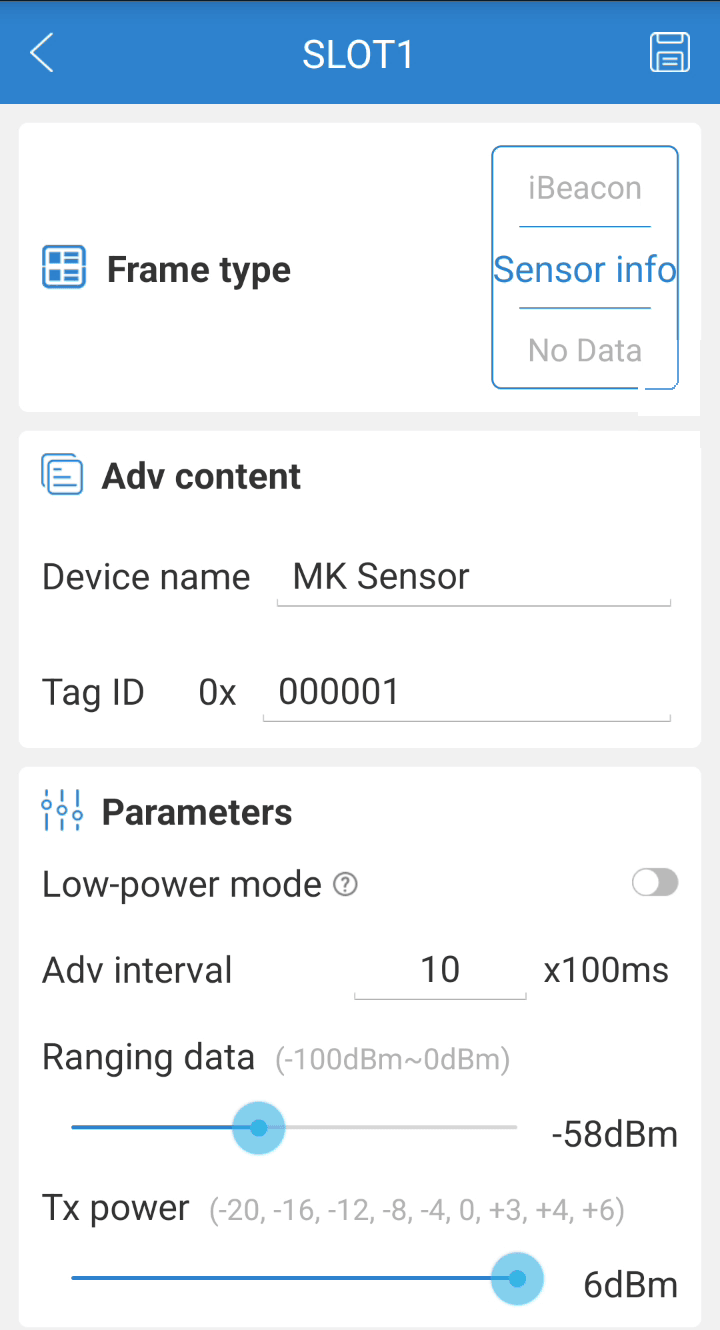
The step-by-step walkthrough with a screenshot of every screen is in the BLE Sensors guide.
What to change before sending
The four lines marked [CAMBIAR] in the file:
| Line | What to enter |
|---|---|
>SBS00E,D44A85BF3DD5,10,120,0< | Your sensor’s MAC (12 hex characters, no :) instead of D44A85BF3DD5 |
>SIP0"..."< and >SIP1"..."< | Host and port of your platform (MAIN channel) |
>SIP4"..."< and >SIP5"..."< | Backup server (BACK); if you don’t use one, repeat the MAIN server |
>SCXAPN...< | Your carrier’s APN |
Load it into the device: over USB with WebSerial (file button 📄, or the 🔌 button on the block below), or in the Configurator with Import → adjust → Send.
A malformed MAC makes the device reject the SBS without storing anything: check that it answers RBS00E,....
Full configuration
This configuration clears all rules, timers, thresholds, waypoints and regions before loading its own. If the device already has a configuration you want to keep, take only the Bluetooth, BLE sensor, User report and Rules blocks.
// ============================================================================
// BLE TEMPERATURE & HUMIDITY SENSOR - RINHO CONDITION (L02S)
// ============================================================================
// Before sending, change: MAC in SBS00, servers SIP0/1/4/5 and APN.
// ============================================================================

// @rinho v2
// @rinho tag=CONDITION_BLE
// @rinho models=zero,spider,smart

// --- TAG ---
>STAGCONDITION_BLE<

// --- IP PROTOCOL: MAIN=TAIP UDP, BACK=TAIP UDP, window=5 ---
>SCXIPPP5<

// --- SERVERS ---
// [CHANGE] MAIN
>SIP0"tracking.mycompany.com",5000<
>SIP1"tracking.mycompany.com",5000<
// [CHANGE] BACK (optional)
>SIP4"backup.mycompany.com",5000<
>SIP5"backup.mycompany.com",5000<
// Keep Alive every 60s on BACK
>SKA60,B<

// --- WIFI: disabled (on Zero IoT this frees the radio for BLE) ---
>SCXWIF0,0,0<

// --- CELLULAR ---
>SSSCELPWR11<
>SCOPS0<
// [CHANGE] APN for your carrier (example: Claro Argentina)
>SCXAPNigprs.claro.com.ar,clarogprs,clarogprs999<
>SCXSIM0<
>SCXSMS0100000<

// --- DATALOG: all, FIFO ---
>SCXDL1,ALL,0,0,0<

// --- GPS: mode S1, fix>=3D, PDOP<=1, sats>=5 ---
>SCXGPS1<
>SCXCQ30105<

// --- IGNITION: normal, ON 3.0s, OFF 10.0s ---
>SCXIGN0,30,100<

// --- INPUT DEBOUNCE: 100ms ---
>SIT0000010001<
>SIT0100010001<
>SIT0200010001<
>SIT0300010001<
>SIT0400010001<
>SIT0500010001<
>SIT0600010001<
>SIT0700010001<

// --- ONEWIRE: disabled ---
>SCXOW0,0<

// --- OUTPUTS: disabled ---
>SCXXP00999999999999<
>SCXXP01999999999999<
>SCXXP02999999999999<

// --- GRADUAL CUT-OFF ---
>SGCD,0,30,4,180<

// --- BLUETOOTH: on ---
>SSSBTHPWR11<

// --- BLE SENSOR ---
// @label BS00 Rinho Condition
// [CHANGE] sensor MAC (12 hex, no ":") · type 10 = Sensor info · 120 s timeout
>SBS00E,D44A85BF3DD5,10,120,0<

// --- TIMERS ---
>STD**D<
>STD00E0003000000<   // TD00: 30 s with ignition
>STD01E0180000000<   // TD01: 30 min without ignition

// --- HEADING CHANGE: 30° ---
>SDC00*030<

// --- SPEED: no thresholds ---
>SVL**D<

// --- VEHICLE VOLTAGE ---
>SAR0006+0550+1050100<   // AR00: low battery 5.5V–10.5V
>SAR0106+1100+9999100<   // AR01: battery OK 11V+
>SAR0206+0000+0500100<   // AR02: disconnected 0V–5V

// --- USER TRIGGERS: clear ---
>SUV*55AA<

// --- USER REPORT: HQ + temp + hum + bat ---
// @label UC00 HQ report + sensor temperature, humidity and battery
>SUC00 $RHQ| #| QHQ,5|$temp:| QBS00.temp,0|$hum:| QBS00.hum,0|$bat:| QBS00.batt,0<

// --- DRIVER MANAGER: clear ---
>SICL*55AA<

// --- RULES ---
>SRL**D<
// @rule 00 Periodic with ignition
>SRL00E;TRG=TD00+;CND=IGN;ACC={GU000H;@LOG}<
// @rule 01 Periodic without ignition
>SRL01E;TRG=TD01+;CND=IGN!;ACC={GU001H;@LOG}<
// @rule 02 Heading change
>SRL02E;TRG=DC00+;CND=IGN;ACC={GU002H;@LOG}{STD00R}{STD01R;@LOG}<
// @rule 03 Ignition on
>SRL03E;TRG=IGN+;ACC={GU003H;@LOG}<
// @rule 04 Ignition off
>SRL04E;TRG=IGN-;ACC={GU004H;@LOG}<
// @rule 05 Low battery
>SRL05E;TRG=AR00+;ACC={GU005H;@LOG}<
// @rule 06 Battery OK
>SRL06E;TRG=AR01+;ACC={GU006H;@LOG}<
// @rule 07 Battery disconnected
>SRL07E;TRG=AR02+;ACC={GU007H;@LOG}<

// --- WAYPOINTS AND REGIONS: clear ---
>SWP**D<
>SRG*55AA<
Rules explained
| Rule | Trigger | Condition | Action | Event |
|---|---|---|---|---|
| RL00 | TD00+ (30 s) | Ignition ON | GU000H | 00 |
| RL01 | TD01+ (30 min) | Ignition OFF | GU001H | 01 |
| RL02 | DC00+ (heading ≥ 30°) | Ignition ON | GU002H + restart TD00 and TD01 | 02 |
| RL03 | IGN+ | — | GU003H | 03 |
| RL04 | IGN- | — | GU004H | 04 |
| RL05 | AR00+ (5.5–10.5 V) | — | GU005H | 05 |
| RL06 | AR01+ (≥ 11 V) | — | GU006H | 06 |
| RL07 | AR02+ (0–5 V) | — | GU007H | 07 |
GU0nnH generates user report UC00 with event nn and high priority; @LOG also stores it in the DataLog.
Event table
| Event | Description |
|---|---|
| 00 | Periodic, ignition on (every 30 s) |
| 01 | Periodic, ignition off (every 30 min) |
| 02 | Heading change |
| 03 | Ignition on |
| 04 | Ignition off |
| 05 | Vehicle battery low |
| 06 | Vehicle battery OK |
| 07 | Vehicle battery disconnected |
Customisation
Immediate high-temperature alert
A user trigger (UV) watches QBS00.temp and a rule reports when the threshold is crossed (example: 8 °C, cold chain):
// UV00: active when temperature exceeds 8.0 °C
>SUV00FQBS00.temp,0,10,80,9999<

// Event 08 when exceeded, event 09 when back to normal
>SRL08E;TRG=UV00+;ACC={GU008H;@LOG}<
>SRL09E;TRG=UV00-;ACC={GU009H;@LOG}<
Add a second sensor
One Rinho Condition per trailer zone (up to 4, BS00 to BS03):
>SBS01E,AABBCCDDEEFF,10,120,0<

// Report with both sensors
>SUC00 $RHQ| #| QHQ,5|$t1:| QBS00.temp,0|$h1:| QBS00.hum,0|$t2:| QBS01.temp,0|$h2:| QBS01.hum,0<
For the door (Hall) sensor (mag_st attribute) and other BLE sensors, see the BLE Sensors guide.
Verification
// Is the sensor visible yet?
>QBS00<
>RBS00E,D44A85BF3DD5,10,120,0,;mag_st:0,mot_st:0,mag_cnt:0,mot_cnt:0,x:12,y:-8,z:1010,temp:23.5,hum:45.0,batt:3012,tag:000001,rssi:-61,type:10,age:2;ID=...

// Individual values
>QBS00.temp<      // 23.5   (°C)
>QBS00.hum<       // 45.0   (%)
>QBS00.batt<      // 3012   (mV)

// Generate the report manually (UC00, event 00)
>GU000H<
Every report is a standard HQ followed by the three sensor fields:
RHQ00<HQ position>,temp:23.5,hum:45.0,bat:3012In SUC00, $RHQ and # build the header with the event number, QHQ,5 appends the body of the HQ report, and each $label: + QBS00.attribute,0 pair adds one field (the leading space suppresses the comma before the value). Full syntax in UC Command.
| Problem | Cause | Solution |
|---|---|---|
QBS00 without temp/hum | BS type does not match the slot frame | Sensor info → type 10; T&H → type 7 |
| Empty fields in the report | More than 120 s without signal | Move the sensor closer, Tx power +6 dBm, check the battery |
| Spider/Smart sees no sensors | Firmware without BLE | Load the Nimble firmware (guide) |
| Zero IoT sees no sensors | WiFi still on | >SSSWIFPWR00< then >SSSBTHPWR11< |
Command reference
| Command | Description | Documentation |
|---|---|---|
SBS / QBS | BLE sensors | BS IoT Command |
SUC | User reports | UC Command |
GU0 | Generate a user report | G Command |
STD | Timers | TD Command |
SDC | Heading change | DC Command |
SAR | Analog thresholds | AR Command |
SRL | Event engine rules | RL Command |
SUV | User triggers | UV Command |
See also
- 📡 BLE Sensors guide — BeaconX Pro walkthrough, Nimble firmware, Hall, fuel, iBeacon
- 📦 Rinho Condition — sensor datasheet
- 🛰️ Basic UDP Tracking — the tracking base without a sensor